Dynamic Workflows: first look
Published on
Almost nine months ago, I was talking about the tools I use. A lot of things have changed since then. The biggest one for me is a switch to the GitHub Copilot app (yep, I remember I wasn’t so impressed with the idea of orchestrators back in January, yet here I am) and completely new ways of working that got unlocked with it.
Today, I’d like to talk about dynamic workflows (DWs), which recently landed in the Copilot app, CLI and SDK. In one sentence: a dynamic workflow is a program that defines how a multi-agent task is carried out. The steps are pinned in code, and agents handle only the parts that need judgment.
Let’s look back for a second
The pace of innovation in the industry is insane. If you have anything else to do besides reading about all the new ideas and approaches that “revolutionize the way we work”, you can easily get lost and struggle with three questions:
- What is this new tech about?
- What problem does it solve?
- Do I have this problem?
The one-sentence definition above doesn’t answer them on its own, and the name is somewhat cryptic, so I’d like to give some context first.
The more capable our models and harnesses become, the less manual steering they require. Only last December, I was demoing this “agent handoff” playground: a simple workflow that passes processed information between several sub-agents under human supervision at every step. A very limited, UI-driven system that felt like a toy, to be fair.
The way we define reusable agentic primitives has evolved as well. Remember Reusable Prompts? In my workflow, Skills have largely replaced them. We simply don’t need to prompt that hard anymore.
Meanwhile, a lot of useful work went into HOW the agent accomplishes the task: Skills mix non-deterministic invocation rules, deterministic scripts and an LLM-driven process gluing them together.
Parallel work got simpler, too. With autopilot mode and the /fleet command, the actual coordination was delegated to the agent, and the human in charge simply described the outcome.
All of this left us with agents that had a mix of deterministic and non-deterministic tools to execute tasks, while the workflow and communication between them stayed purely non-deterministic. Agents are pretty good at following instructions, but they still occasionally fail.
And that’s the problem dynamic workflows solve: the coordination itself is non-deterministic, and there is no good way to share it. DWs let us:
- codify the coordination and orchestration of several agents
- share and reuse these codified workflows
Now let’s take a look at an example.
Sample workflow
I’ll take the sample workflow from the demo repository linked above.
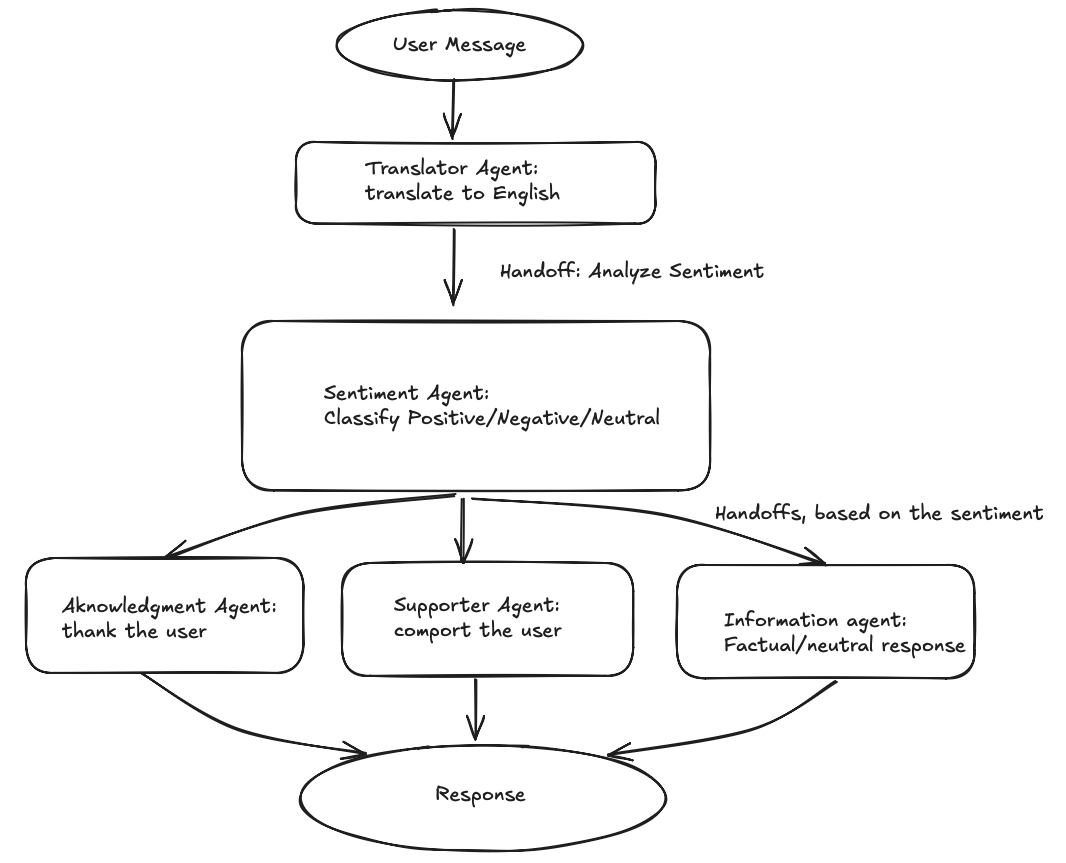
This workflow is only implicit. If we look at the .github/agents/ dir, we’ll see that these agents are not really coupled, and even the user-support-operator.agent.md file was added to describe the whole flow end-to-end.
But there is a problem here: we have a Markdown file that pretends to be a program. Well, Markdown is fine, but we have better ways to define the deterministic algorithm. You know, like a programming language.
And that’s what makes dynamic workflows different. Other ways to invoke a multi-agent flow, like autopilot or /fleet, delegate the flow design and orchestration to the agent: it’s free to analyze the problem and build its own plan (or follow one provided externally). DWs pin the flow in code and allow each agent to be non-deterministic only within the boundaries of its own task.
I also like that it’s not yet another visual programming tool, where we define steps on a canvas. We can use natural language instead and make an LLM generate the code for us.
The best way to understand something is to build it, so let’s dive in!
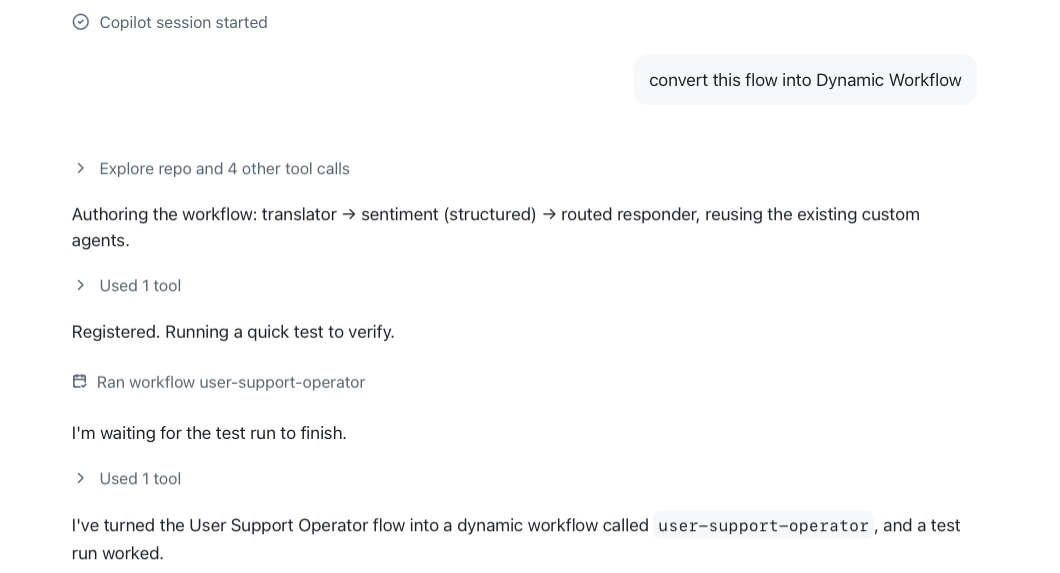
First, I’m going to check out the older demo project and ask the Copilot app to build me a DW based on the repo content.
Anatomy of a Dynamic Workflow
By default, Copilot keeps a newly authored workflow in an extension scoped to the current session. To share it with everyone working on the repo, it needs to live in the repository’s .github/extensions/ directory (you can simply ask Copilot to move it there). Either way, the workflow consists of two files:
.github/
└── extensions/
    └── user-support-operator/
        ├── config.mjs
        └── extension.mjs
user-support-operator is now a dynamic workflow registered as a Copilot extension.
extension.mjs is the entry point. We’ll take a look at it later. Let’s focus on config.mjs first.
export const workflowMeta = {
  name: "user-support-operator",
  description: "End-to-end support flow: translate → sentiment → routed response ...",
  phases: [
    { title: "Translate", detail: "translator agent → English + original language" },
    { title: "Sentiment", detail: "sentiment agent → Positive/Negative/Neutral" },
    { title: "Respond", detail: "acknowledgment / supporter / information agent" },
  ],
  argsSchema: { /*SKIPPED*/ },
};
export const translationSchema = { /*SKIPPED*/ };
export const sentimentSchema = { /*SKIPPED*/ };
export const responderAgents = {
  Positive: "acknowledgment",
  Negative: "supporter",
  Neutral: "information",
};
As we can see, it’s metadata and contracts rather than the flow itself: name, description, phases and schema contracts. The flow lives in extension.mjs. If I drop the SDK-related code (extension registration), retries, logs and other technical logic, it boils down to this:
async (ctx) => {
  const message = typeof ctx.args?.message === "string" ? ctx.args.message.trim() : "";

  ctx.phase("Translate");
  const translation = await callWithFallback("translator", /* … */);

  ctx.phase("Sentiment");
  const analysis = await callWithFallback("sentiment", /* … */);
  const sentiment = analysis?.sentiment ?? "Neutral";

  ctx.phase("Respond");
  const responder = responderAgents[sentiment];
  const response = await callWithFallback(responder, /* … */);

  return {
    response: response ?? null,
    sentiment,
    explanation: analysis?.explanation,
    responder,
    originalLanguage: translation?.originalLanguage,
    translatedMessage: translation?.translatedMessage,
    degraded: !translation || !analysis,
  };
};
Here we drive agent invocation step by step via the codified flow, switching between phases.
Configuration options
Dynamic workflows come with a handful of built-in limits. I’m not going to list every detail; I’ll share the doc link instead. At the time of writing, it’s possible to control:
- AI Credit consumption (an approximate cap, not a hard ceiling)
- Maximum number of total and concurrent subagents
- Maximum active running time (paused time doesn’t count)
Limits can be set in the prompt, in the workflow code, or as personal defaults (in that order of priority). When a run hits a limit, it stops but keeps its saved results, so you can raise the limit and resume it later.
Just enough primitives. The rest we can define in code.
Invocation options
Apart from direct invocation in the session (just tell Copilot to run the workflow by name), we can trigger dynamic workflows in scripts by passing the name of the workflow and its arguments to the Copilot CLI tool. Dynamic workflows are still experimental in the CLI, hence the --experimental flag. And since workflow run doesn’t show permission prompts, the tools the agents need have to be allowed up front.
copilot --experimental --allow-all-tools \
        workflow run user-support-operator \
        --args '{"message":"Hola, mi pedido llegó roto y estoy muy molesto"}'
Running it produces:
● Translate

{
    "translatedMessage":"Hello, my order arrived broken and I am very upset.",
    "originalLanguage":"Spanish",
    "originalMessage":"Hola, mi pedido llegó roto y estoy muy molesto"
}

● Detected language: Spanish

● Sentiment
{
    "sentiment":"Negative",
    "explanation":"The user is very upset because their order arrived broken."
}
● Sentiment: Negative

● Respond

Hola, lamento mucho que tu pedido haya llegado roto.
Entiendo perfectamente tu molestia y te pido disculpas por el inconveniente.
Por favor, compártenos el número de pedido y, si es posible,
una foto del daño para ayudarte cuanto antes con un reemplazo o reembolso.

{
    "response":"Hola, lamento mucho que tu pedido haya llegado roto. ...",
    "sentiment":"Negative",
    "explanation":"The user is very upset because their order arrived broken.",
    "responder":"supporter",
    "originalLanguage":"Spanish",
    "translatedMessage":"Hello, my order arrived broken and I am very upset.",
    "degraded":false
}
Distribution and Discoverability
Dynamic workflows live in extensions, so they are shared the same way: copy the extension into ~/.copilot/extensions/ to use it across all your sessions, or into the repository’s .github/extensions/ to share it with your team. To go wider, package it as a plugin. GitHub Copilot has a working plugin ecosystem.
This means all standard options are available to us:
- personal vs project installations
- plugin marketplace support for discoverability and distribution
Not a new idea
Credit where it’s due: Copilot isn’t the first to ship this. Claude Code introduced dynamic workflows back in May: Claude writes a JavaScript orchestration script for the task, a runtime executes it in the background across many subagents, and you can save a run’s script as a slash command to reuse later. Anthropic’s docs frame the difference nicely as “who holds the plan”: with subagents and skills, Claude decides turn by turn what runs next; with a workflow, the script does.
OpenAI Codex doesn’t have an equivalent first-party feature that I’m aware of. Its subagent workflows are prompt-driven, which is much closer to /fleet. If you want the orchestration in code, you script it yourself with the Codex SDK.
The difference I see in Copilot’s take is the packaging. In Claude Code, a workflow usually starts as an ad-hoc script written for a specific task, which you can then save. In Copilot, a workflow is a program that lives in an extension from day one: you can version it in a repo, distribute it via plugins, and run it headless from a script or a CI pipeline with copilot workflow run.
Looking forward
I hope at this point you’ve got a solid understanding of what dynamic workflows are, how they work and what they can do. So, back to the three questions from the beginning:
- What is it about? Orchestration as code: the flow is pinned, and agents only make judgment calls inside their own steps.
- What problem does it solve? Non-deterministic coordination that you can’t reliably repeat or share.
- Do I have this problem? Only if you run the same multi-agent process over and over, or need it to run unattended.
Now let’s speculate about the future. Predicting anything in tech is fun these days. The cycle is so short that you’ll know if you were wrong in no time.
DWs are a niche tool, not in terms of value, but in terms of how often you’ll write one. They are codified, well-structured and resumable workflows that serve a particular purpose.
They are obviously a way to build predictable chains of agentic steps, which makes a lot of sense in CI and other automation, where reproducibility matters more than in an interactive coding session. They also make AI Credit consumption more predictable: the orchestration itself is scripted, so no tokens are “burned” on planning, and the configured limits keep the total spend capped. That doesn’t necessarily mean cheaper, though — fanning out to many agents can easily cost more than a single session.
Dynamic workflows are a good primitive. I do not expect them to become as ubiquitous as Skills, but when you do need one, nothing else does the job as well, so I’d be pleased to see them around.
Disclosure
I’m employed by GitHub at the time of writing this post. All opinions are my own.