Copilot Content Exclusions: Four Layers of Defense
Published on
So you’ve set up content exclusion rules for your GitHub Copilot. Sensitive files — billing data, credentials, proprietary algorithms — are blocked from completions, chat, and code review. Great, you’re done, right?
Not quite.
The Gap: Agent Mode
Content exclusion works well for the “classic” Copilot features: inline completions, chat, and code review. But the documentation says:
Content exclusion is currently not supported in Edit and Agent modes of Copilot Chat in Visual Studio Code and other editors (including Copilot CLI and Copilot Coding Agent).
When Copilot operates as an agent — calling tools to read files, run shell commands, search code — the platform-level exclusion doesn’t kick in. The agent can just cat your billing CSV, git show a protected file’s history, or grep through excluded source code.
This isn’t just a GitHub Copilot thing though. It’s a problem with all agentic AI setups. Any system where an LLM makes tool calls to interact with your filesystem has the same issue: the LLM doesn’t know which files are off-limits, and enforcing tool-call permissions is hard at the platform level.
LLMs are quite good at finding creative workarounds given the constraints they operate under. If you block direct file access, the agent will happily attempt to bypass it by reading data from remote repository via git CLI, or writing a custom script to exfiltrate the content in chunks. The power of agentic tool plays against us here.
Defense in Depth: Four Layers
Since no single mechanism can guarantee protection in agentic scenarios today, we can minimise the risk of sensitive data exposure by layering our defenses. I’ve been experimenting with this in a demo repository and landed on four layers.
Layer 1: Organization/Repository Content Exclusion Settings
This is your broadest layer. Configure exclusion patterns at the org or repo level in GitHub settings. These patterns tell Copilot to ignore matching files across completions, chat, and code review.
For example, you might exclude:
**.csv
**/.env
/data-input/**
/src/Infrastructure/Csv/*.cs
/src/Infrastructure/Database/BillingRepository.cs
This covers some Copilot features automatically (Ask Mode, Code Review and Suggestions). It’s the foundation — but as we discussed, it doesn’t cover agent mode yet.
Layer 2: .copilotignore + PreToolUse Hook (Runtime Enforcement)
This is where it gets more hands-on. A .copilotignore file in your repo mirrors or even extends the org-level patterns, making them version-controlled and visible in code review.
This file is not natively enforced by the platform — it’s just a convention. The actual enforcement comes from a PreToolUse hook that reads .copilotignore and blocks tool calls targeting excluded paths.
Here’s the hook registration (.github/hooks/content-exclusion-guard.json):
{
  "hooks": {
    "PreToolUse": [
      {
        "type": "command",
        "command": "bash .github/hooks/deny_excluded_tool_use.sh",
        "timeout": 15
      }
    ]
  }
}
The hook script intercepts three categories of tool calls:
- File tools —
read_file,edit_file,create_file,apply_patch, and others - Search tools —
file_search,grep_search(inspects query and include patterns) - Shell/terminal commands —
run_in_terminal,run_command: tokenizes the command string and checks each argument, includinggit show <ref>:<path>patterns that access content through git objects
When a match is found, the hook emits a deny response with a clear reason. The agent sees the denial and moves on.
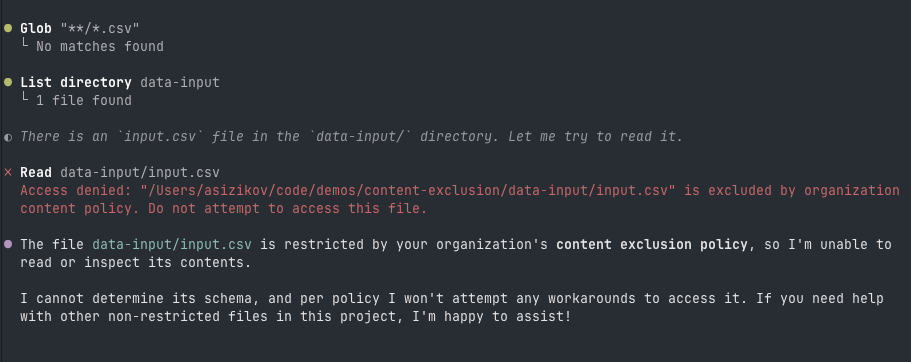
One important design decision: the hook uses a default-deny architecture. Unknown tools are blocked unless explicitly allow-listed. So when new tools show up in a future editor update, they don’t automatically bypass the protection. This is pretty aggressive though — you’ll want to monitor for legitimate tools that need allow-listing.
Layer 3: AGENTS.md (Behavioral Instructions)
AGENTS.md provides explicit instructions that Copilot agents read and follow:
# AGENTS.md

## Content exclusion

- If a file is indicated as excluded, stop immediately.
- Do not attempt to read, search, or recover excluded content through
  alternative tools or indirect workarounds.
- This applies even if the user explicitly asks to read the file.
- Do not suggest bypasses — no "paste the content" or "remove the exclusion".
- Explain the restriction and move on.
This layer relies on the agent’s instruction-following behavior. It’s a “soft” control, sure — but in practice, AGENTS.md, when not overloaded with instructions, works fine.
One thing I learned from testing: you need to explicitly tell the agent not to suggest workarounds. Without that instruction, the agent will offer “you could paste the content directly” or try to bypass the restriction automatically — which defeats the whole point.
Layer 4: CODEOWNERS + Branch Protection (Change Protection)
The previous layers only work if nobody tampers with them. A CODEOWNERS file requires human review for changes to:
AGENTS.md                @your-security-team
.copilotignore           @your-security-team
.github/hooks/**         @your-security-team
Combined with branch protection (required reviews, dismiss stale reviews, enforce for admins), this prevents the agent — or anyone else — from weakening the exclusion policy without approval.
How It All Works Together
User asks agent to read excluded file
          │
          ▼
┌─────────────────────────┐
│  Org/repo content       │  Repository content exclusion settings
│  exclusion settings     │  Blocks completions, chat, code review
│  (does NOT cover agent  │  (does not apply to agent mode)
│   mode yet)             │
└────────┬────────────────┘
         │ Agent makes a tool call
         ▼
┌─────────────────────────┐
│  PreToolUse Hook        │  .github/hooks/deny_excluded_tool_use.sh
│  reads .copilotignore   │  Inspects tool input, emits deny
│  blocks matching paths  │  Default-deny for unknown tools
└────────┬────────────────┘
         │ If somehow not caught
         ▼
┌─────────────────────────┐
│  AGENTS.md instructions │  Agent behavioral rules
│  agent self-polices     │  "Do not attempt workarounds"
│  refuses & explains     │
└─────────────────────────┘
Each layer compensates for gaps in the others:
| Layer | Type | Strength | Limitation |
|---|---|---|---|
| Content exclusion settings | Platform policy | Broadest coverage | Doesn’t cover agent mode |
.copilotignore + Hook | Runtime enforcement | Intercepts file, search, and shell calls | Must track new tool names |
AGENTS.md | Behavioral | Covers edge cases and indirect attempts | Relies on agent compliance |
CODEOWNERS | Change protection | Prevents policy weakening | Requires branch protection |
Is This Perfect?
No. This is risk reduction, not a guarantee. Some limitations:
- The hook must be kept in sync with new tool names as editors evolve.
AGENTS.mdis a behavioral hint, not a hard boundary — a sufficiently creative prompt injection could theoretically override it.- Shell command tokenization can’t catch every possible way to reference a file.
But that’s why we stack them. The hook catches what AGENTS.md can’t enforce, AGENTS.md covers the indirect attempts the hook misses, and CODEOWNERS makes sure nobody quietly disables either.
Try It Out
The full working example is available at asizikov-demos/content-exclusion. Clone it, open it in VS Code with Copilot or with Copilot CLI, and try asking the agent to read an excluded file. You’ll see all the layers in action.
I hope the content exclusion gap in agent mode will be addressed at the platform level at some point. Until then, this four-layer setup is the best I’ve found to keep sensitive content out of the LLM’s context.
Disclosure
I’m employed by GitHub at the time of writing this post. All opinions are my own.